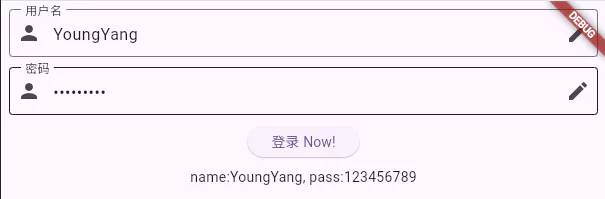
# 输入框
TextField用于文本输入,有者丰富的属性,定义如下。
# 定义
const TextField({
Key? key,
// 控制器,用于控制输入框的文本内容、监听变化等
this.controller,
// 焦点管理,用于控制输入框的焦点状态
this.focusNode,
// 装饰器,用于设置输入框的背景、边框、提示文本等
this.decoration = const InputDecoration(),
// 键盘输入类型,例如文本、数字、电话等
TextInputType? keyboardType,
// 键盘动作按钮类型,例如搜索、发送等
this.textInputAction,
// 文本大小写规则,例如全部大写、首字母大写等
this.textCapitalization = TextCapitalization.none,
// 正在编辑的文本样式
this.style,
// 文本的排版样式
this.strutStyle,
// 文本在水平方向的对齐方式
this.textAlign = TextAlign.start,
// 文本在垂直方向的对齐方式
this.textAlignVertical,
// 文本方向,例如从左到右或从右到左
this.textDirection,
// 是否只读,设置为 true 时输入框不可编辑
this.readOnly = false,
// 工具栏选项,例如复制、粘贴等
ToolbarOptions? toolbarOptions,
// 是否显示光标
this.showCursor,
// 是否自动获取焦点
this.autofocus = false,
// 密文显示的字符,默认为 '•'
this.obscuringCharacter = '•',
// 是否以密文形式显示文本
this.obscureText = false,
// 是否启用自动更正
this.autocorrect = true,
// 智能破折号类型
SmartDashesType? smartDashesType,
// 智能引号类型
SmartQuotesType? smartQuotesType,
// 是否启用输入建议
this.enableSuggestions = true,
// 输入框的最大行数,默认为 1;为 null 时无行数限制
this.maxLines = 1,
// 输入框的最小行数
this.minLines,
// 是否扩展输入框以填充父容器
this.expands = false,
// 输入框文本的最大长度,设置后会显示文本计数
this.maxLength,
// 是否强制执行最大长度限制(已废弃)
(
'Use maxLengthEnforcement parameter which provides more specific '
'behavior related to the maxLength limit. '
'This feature was deprecated after v1.25.0-5.0.pre.',
)
this.maxLengthEnforced = true,
// 最大长度的执行策略
this.maxLengthEnforcement,
// 输入框内容改变时的回调函数
this.onChanged,
// 编辑完成时的回调函数
this.onEditingComplete,
// 提交输入内容时的回调函数
this.onSubmitted,
// 处理私有命令的回调函数
this.onAppPrivateCommand,
// 输入格式化器,用于限制输入内容的格式
this.inputFormatters,
// 是否启用输入框,禁用时显示禁用样式
this.enabled,
// 光标宽度
this.cursorWidth = 2.0,
// 光标高度
this.cursorHeight,
// 光标圆角
this.cursorRadius,
// 光标颜色
this.cursorColor,
// 光标高度样式
this.selectionHeightStyle = ui.BoxHeightStyle.tight,
// 光标宽度样式
this.selectionWidthStyle = ui.BoxWidthStyle.tight,
// 键盘外观,例如浅色或深色
this.keyboardAppearance,
// 输入框滚动时的内边距
this.scrollPadding = const EdgeInsets.all(20.0),
// 拖动行为
this.dragStartBehavior = DragStartBehavior.start,
// 是否启用交互式选择
this.enableInteractiveSelection = true,
// 文本选择控件
this.selectionControls,
// 点击输入框时的回调函数
this.onTap,
// 鼠标指针样式
this.mouseCursor,
// 自定义计数器的构建函数
this.buildCounter,
// 滚动控制器
this.scrollController,
// 滚动物理效果
this.scrollPhysics,
// 自动填充提示
this.autofillHints = const <String>[],
// 剪裁行为
this.clipBehavior = Clip.hardEdge,
// 恢复 ID,用于状态恢复
this.restorationId,
// 是否启用个性化学习
this.enableIMEPersonalizedLearning = true,
})
1
2
3
4
5
6
7
8
9
10
11
12
13
14
15
16
17
18
19
20
21
22
23
24
25
26
27
28
29
30
31
32
33
34
35
36
37
38
39
40
41
42
43
44
45
46
47
48
49
50
51
52
53
54
55
56
57
58
59
60
61
62
63
64
65
66
67
68
69
70
71
72
73
74
75
76
77
78
79
80
81
82
83
84
85
86
87
88
89
90
91
92
93
94
95
96
97
98
99
100
101
102
103
104
105
106
107
108
109
110
111
112
113
114
2
3
4
5
6
7
8
9
10
11
12
13
14
15
16
17
18
19
20
21
22
23
24
25
26
27
28
29
30
31
32
33
34
35
36
37
38
39
40
41
42
43
44
45
46
47
48
49
50
51
52
53
54
55
56
57
58
59
60
61
62
63
64
65
66
67
68
69
70
71
72
73
74
75
76
77
78
79
80
81
82
83
84
85
86
87
88
89
90
91
92
93
94
95
96
97
98
99
100
101
102
103
104
105
106
107
108
109
110
111
112
113
114
# 示例
import 'package:flutter/material.dart';
class InputPage extends StatefulWidget {
const InputPage({Key? key}) : super(key: key);
State<InputPage> createState() => _InputPageState();
}
class _InputPageState extends State<InputPage> {
// 文本消息
String _message = "";
// 输入框控制器
final TextEditingController _controllerName = TextEditingController();
final TextEditingController _controllerPassword = TextEditingController();
// 管理焦点
FocusNode focusNodeName = FocusNode();
FocusNode focusNodePassword = FocusNode();
FocusScopeNode? focusScopeNode;
// 输入框 - 用户名
Widget _buildName() {
return TextField(
// 控制器
controller: _controllerName,
// 焦点
autofocus: true,
// 焦点管理
focusNode: focusNodeName,
// 输入框的样式
decoration: const InputDecoration(
labelText: '用户名',
hintText: '请输入',
prefixIcon: Icon(Icons.person),
suffixIcon: Icon(Icons.edit),
border: OutlineInputBorder(),
),
// 输入改变事件
onChanged: (String value) {
setState(() {
_message = value;
});
},
// 提交回车事件
onSubmitted: (String value) {
focusScopeNode ??= FocusScope.of(context);
focusScopeNode?.requestFocus(focusNodePassword);
},
);
}
// 输入框 - 密码
Widget _buildPassword() {
return TextField(
controller: _controllerPassword,
// 密码显示
obscureText: true,
// 焦点管理
focusNode: focusNodePassword,
// 输入框的样式
decoration: const InputDecoration(
labelText: '密码',
hintText: '请输入',
prefixIcon: Icon(Icons.person),
suffixIcon: Icon(Icons.edit),
border: OutlineInputBorder(),
),
);
}
// 按钮
Widget _buildButton() {
return ElevatedButton(
child: const Text('登录 Now!'),
onPressed: () {
setState(() {
_message =
'name:${_controllerName.text}, pass:${_controllerPassword.text}';
});
},
);
}
// 显示
Widget _buildMessage() {
return Text(_message);
}
void dispose() {
// 释放控制器
_controllerName.dispose();
_controllerPassword.dispose();
super.dispose();
}
Widget build(BuildContext context) {
return Scaffold(
body: Padding(
padding: const EdgeInsets.all(8.0),
child: Column(
children: [
_buildName(),
const SizedBox(height: 10),
_buildPassword(),
const SizedBox(height: 10),
_buildButton(),
const SizedBox(height: 10),
_buildMessage(),
],
),
),
);
}
}
1
2
3
4
5
6
7
8
9
10
11
12
13
14
15
16
17
18
19
20
21
22
23
24
25
26
27
28
29
30
31
32
33
34
35
36
37
38
39
40
41
42
43
44
45
46
47
48
49
50
51
52
53
54
55
56
57
58
59
60
61
62
63
64
65
66
67
68
69
70
71
72
73
74
75
76
77
78
79
80
81
82
83
84
85
86
87
88
89
90
91
92
93
94
95
96
97
98
99
100
101
102
103
104
105
106
107
108
109
110
111
112
113
114
115
116
117
118
2
3
4
5
6
7
8
9
10
11
12
13
14
15
16
17
18
19
20
21
22
23
24
25
26
27
28
29
30
31
32
33
34
35
36
37
38
39
40
41
42
43
44
45
46
47
48
49
50
51
52
53
54
55
56
57
58
59
60
61
62
63
64
65
66
67
68
69
70
71
72
73
74
75
76
77
78
79
80
81
82
83
84
85
86
87
88
89
90
91
92
93
94
95
96
97
98
99
100
101
102
103
104
105
106
107
108
109
110
111
112
113
114
115
116
117
118